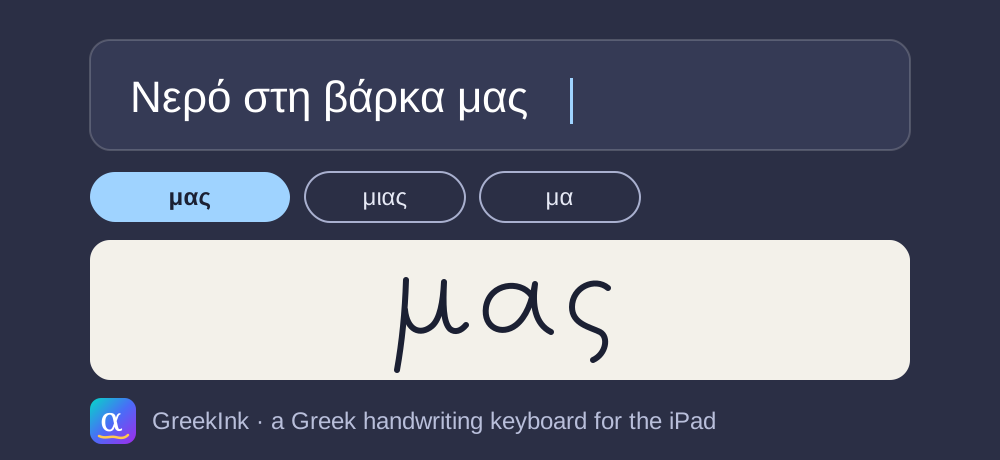
TL;DR: I write Greek by hand on my iPad with an Apple Pencil and wanted it as typed text, in any app. Apple's handwriting recognition doesn't support Greek, and I couldn't find an app I could try without paying first. So I built GreekInk, a keyboard where I write on a strip at the bottom of the screen and the words appear where the cursor is. Everything runs on the iPad, so nothing I write gets sent anywhere.
The problem
It's the same problem I had with Android Auto. The big companies don't bother supporting less used languages such as Greek, and it's frustrating.
On the iPad, the Apple Pencil can turn handwriting into text in any text field. Apple calls this Scribble. On iPadOS 27 it supports 44 language variants, including Arabic, Japanese, Ukrainian, Russian and Turkish, but not Greek, and developers can't add a language to it. Apple also has handwriting keyboards, but only for Chinese, Cantonese and Japanese.
I looked on the App Store for a keyboard that reads Greek handwriting. MyScript made the best-known one, Stylus, but has since retired it. I found another one that lists Greek among more than 100 languages. It's free to download, but it has in-app purchases from $2.99 to $49.99, it shows ads, and its privacy label says it tracks you for advertising. Plus, I couldn't tell if it works for Greek without paying first.
So I figured the only way to get text into any app on the iPad is a custom keyboard, and I decided to build one.
What it does
- I write a word or a few words on the strip and pause. The keyboard types its best guess with a space after it, and shows up to five other options above the strip. I tap one to swap it in.
- I write a zigzag to erase the ink. On an empty strip, a zigzag deletes the last word.
- Backspace removes the last stroke, or deletes text when the strip is empty.
- Above the strip there's a row of punctuation keys, and a 123 key for numbers.
- A language key switches between Greek and English.
It works in Notes, Mail, messages and anywhere else with a text field.
How it works
The keyboard sends my Pencil strokes to Google's ML Kit Digital Ink, which has a Greek model that runs on the iPad. ML Kit reads each stroke as points and timings, not as a picture, and returns a word in under a tenth of a second. Along with the strokes, the keyboard sends the last 20 characters before the cursor, so ML Kit knows the words that come before the one I'm writing. That helps it pick the right word.
I wrote it in Swift, even though I mostly write React Native. iOS closes a keyboard without warning when it uses too much memory, and a JavaScript runtime would use most of it.
Privacy
My handwriting and my text stay on the iPad. iOS only lets a keyboard connect to the internet if you turn on Full Access for it, and GreekInk doesn't ask for it. Only the app goes online, to download the Greek model, and ML Kit in the app sends Google metrics about how its APIs are used. Google's ML Kit terms say ML Kit processes the input on the device and doesn't send it to Google.
Getting the model into the keyboard
Because the keyboard can't connect to the internet, it can't download the Greek model. So I made the app download it and share it with the keyboard. That way the keyboard works without Full Access.
I also expected memory to be a problem. People say iOS gives a keyboard 48–60 MB, and the Greek model alone is about 22 MB. When I measured it on my iPad Air, the limit was about 90 MB, and the keyboard used only 9 MB with the model loaded. That's because iOS reads the model file from disk as needed, instead of loading all of it into memory.
My palm stopped the Pencil
Before the keyboard, I built a test app with a full-screen writing area. In it, the Pencil sometimes drew nothing. The logs showed that my palm touched the screen first and took the only touch the canvas accepted, so the Pencil's touches never got through.
I changed the canvas to accept several touches and to let the Pencil take over from a finger. It now ignores fingers for a second and a half after the Pencil touches the screen, and ignores any touch wider than a fingertip. After the change, I drew 101 strokes in a row and all of them showed up.
A crash inside ML Kit
ML Kit's iOS API marks the text before the cursor as optional, but when I left it out, ML Kit crashed. Sending an empty string instead stopped the crash.
Deleting with a zigzag
Google's model list includes a Greek gesture model for scratching out words. When I tried to download it on the iPad, it failed with "unknown model tag", because the iOS version of ML Kit doesn't have it.
So I wrote my own check. The keyboard treats a stroke as a zigzag when:
- it's a single stroke, wide and flat
- it goes back and forth across at least half its width, three times or more
It ignores tiny dots the Pencil leaves just before the zigzag. On an empty strip it deletes only the last word on the current line, never a line break. My normal writing never set it off.
While testing, I also found that in Notes, Apple's own Scribble scratch-out deletes the words the keyboard typed, even though Scribble can't read Greek.
Numbers next to letters
When I wrote "1st" the Greek way, a 1 followed by a Greek letter, ML Kit read it as two Greek letters. That's because the Greek model is built to read Greek words, so it prefers letters over digits, and ML Kit has no model for digits on their own.
So I added my own number mode, which I turn on with a 123 key. In number mode, the keyboard reads what I write as numbers first, and unlike writing mode, it doesn't add a space after a digit or a punctuation mark. So if I write "15:" and then "30", I get "15:30".
How well it reads
One of the first long sentences I wrote to test it was "Since Apple doesn't support Greek, I made my own app that does." I wrote it in Greek, all words except Apple. It came out right except for the word Apple, which turned into its best guess in Greek letters. The model does read bilingual text, which matters to me because I write technical notes. I just need to write clearly, so it's obvious which alphabet I'm writing in.
I went through the keyboard's logs for the final version and counted the writes where it was clear what I meant. I only tested my own handwriting, so it's a rough count.
- Short words and song titles: 11 out of 13 came out right the first time, and the other 2 had the right word one tap away in the options.
- A long message I wrote fast, in Greek and English: 32 out of 56 came out right the first time, 7 had the right word one tap away, and 17 didn't have it at all.
On short words a miss was usually one letter, like "decembe" for "December". In the long message some words came out as nonsense, and a few lost their accents. When a word comes out wrong, I prefer to scratch it out and correct it in place. I find that easiest.
Building it
I built it using Claude Code. It took about four hours from an empty folder to a keyboard working on my iPad, and two days in total with the polish.
Before building the features, I tested the three riskiest unknowns on the iPad: the keyboard memory limit, whether ML Kit runs inside a keyboard, and whether Pencil touches reach a keyboard. All three worked.
I made the app and the keyboard write logs, and pulled them off the iPad with xcrun devicectl, along with any crash logs. That way I could write on the iPad and then read what happened, without taking screenshots. That's how I found the palm problem and the crash.
To add ML Kit I had to use CocoaPods, because Google only ships ML Kit for iOS through CocoaPods, not as a Swift package. CocoaPods' central repository stops accepting new versions on 2 December 2026. I pinned the ML Kit version, which keeps installing after that date, so nothing breaks. I just won't get ML Kit updates through CocoaPods.
Can you use it?
It isn't on the App Store yet, so feel free to build it yourself.
You need a Mac with Xcode 27.2 or newer and CocoaPods, a free Apple ID signed in to Xcode, an iPad on iPadOS 17 or newer, and a USB cable. An Apple Pencil works best, but a finger works too. The first setup takes about 10 minutes, mostly for the first build. Then you add the keyboard in Settings, without turning on Full Access.
Greek isn't the only language missing from Scribble, and ML Kit has handwriting models for more than 300 languages. To use the keyboard for another one, you change a few parts of the code: the language code it sends to ML Kit, the language key, the punctuation row, the rule for automatic spaces, and the letters that number mode turns into digits. I've only tried it with Greek and English, but the same changes should work for any language written left to right with spaces between words.
The README on GitHub has every step: altany/apple-greek-handwriting.